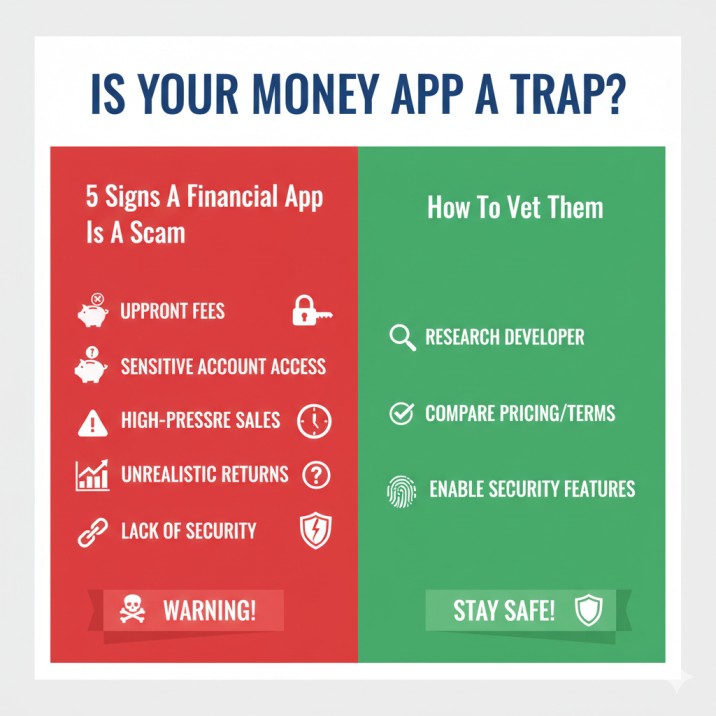
We live in a golden age of financial technology. You can budget, invest, save, and send money all from the palm of your hand. New, innovative financial apps appear on app stores every single day, promising to grow your wealth, simplify your life, or give you access to exclusive investments.
But there’s a dark side to this boom. For every legitimate FinTech company, there are dozens of elaborate scams designed to do one thing: steal your money.
These fake financial apps are often sophisticated. They have slick designs, glowing five-star reviews, and professional-looking websites. They are designed to exploit your trust and your desire for a better financial future. So, how do you tell the difference between a groundbreaking new tool and a digital trap? How do you protect yourself from money app scams?
This is your advanced, in-depth guide to spotting the red flags. We will go beyond the obvious “typos in the app” and dive deep into the psychological tricks, technical red flags, and investigative steps you must take before you trust any app with your financial information.
(Disclaimer: This article is for educational purposes only and does not constitute financial or legal advice. We are not financial advisors. All financial activities, from using apps to investing, carry inherent risks. You should always conduct your own thorough research (DYOR) and consult with a qualified professional before making any financial decisions.)
The Core Problem: Why Fake Financial Apps Are So Dangerous
Before we get to the signs, you need to understand the threat. A fake financial app isn’t just an annoyance; it’s a direct line into your wallet.
The goal of a scam investment app or fake crypto wallet can be:
- Outright Theft: You deposit money to “invest,” but the money goes straight to the scammer. The “gains” you see on your dashboard are just numbers on a screen. When you try to withdraw, you find you can’t.
- Data Harvesting: The app is a form of malware. It asks for invasive permissions to read your contacts, messages, or photos, or it uses a “keylogger” to steal the passwords for your real banking apps.
- Identity Theft: The app’s “Know Your Customer” (KYC) process is a sham. It asks for your driver’s license, social security number, and passport, not to comply with regulations, but to steal your identity and open new accounts in your name.
The stakes are incredibly high. That’s why your skepticism needs to be even higher.
Sign 1: The App Guarantees Unrealistic High Returns
This is the oldest trick in the book, repackaged for the digital age. If a financial app promises you massive profits with little or no risk, it is almost certainly a scam.
Why “Guaranteed Profits” Are the Biggest Red Flag for Investment Apps
Legitimate finance doesn’t work on “guarantees.” It works on risk and reward.
- Stocks can go up, but they can also go to zero.
- Bonds are safer, but the returns are much lower.
- Crypto is famous for its volatility, where 50% drops are common.
Any person or app that tells you they have a “secret formula,” a “trading bot,” or an “AI algorithm” that guarantees 5% interest per day is lying. These are lures used by Ponzi schemes.
Here’s how the scam works:
- You download the app and deposit $1,000.
- The app’s dashboard shows your investment growing by $50 every day! It’s exciting.
- You tell your friends, who also join and deposit their money.
- You decide to test a withdrawal. You “withdraw” $100, and it actually works. This builds immense trust.
- Here’s the trick: The $100 you “withdrew” wasn’t profit. It was just a tiny piece of the new money your friends (or other new victims) deposited.
- You feel confident and deposit $10,000 more.
- One day, you go to withdraw, and the app is gone. The website is offline. The “support” email bounces. Your money is gone forever.
If it sounds too good to be true, it always is. No app can magically eliminate market risk.
How to Spot Ponzis and Pyramid Schemes in App Form
Be wary of any app where the primary feature is recruiting other people.
- Legit Referral: “Get $10 when your friend signs up and funds their account.” This is a common, one-time marketing cost for a real business.
- Pyramid Scheme: “Earn 20% of all the profits from the people you refer! And 10% from their referrals!”
If the “profit” model is based on an endless chain of new members rather than a real, understandable product or investment, you are looking at a pyramid scheme.
Sign 2: Vague, Hidden, or Non-Existent Company Information
A legitimate FinTech company is a real business. It has founders, executives, a physical headquarters (even if it’s small), and a legal registration. Scammers, on the other hand, hide in the shadows.
How to Research a FinTech Company Behind an App
When you download a new financial app, you should immediately become an investigative journalist.
- Find the “About Us” Page: Go to the app’s official website (not just the app store page). Is there an “About Us” or “Team” page?
- Investigate the Founders: Do they list their CEO, CTO, and other executives? Are their names provided?
- Go to LinkedIn: Search for those names on LinkedIn. Do they have real, established profiles with work histories, connections, and photos? Or were their profiles created two weeks ago with no connections? If you can’t find any information on the people running a financial company, run away.
Scammers will often use stock photos and fake names. A quick reverse image search of their “CEO” might reveal the photo is just a stock image labeled “middle-aged business person smiling.”
Checking for a Physical Address and Real Contact Information
A real company has to be based somewhere.
- Look for an address: Is there a physical headquarters address on the website?
- Google that address: Is it a real office building, or is it a P.O. box, a mail-forwarding service, or a random residential house?
- Test the “Contact Us”: Send an email to their support address with a simple question. Do you get a real response from a real person, or just an automated reply (or no reply at all)? Is the only contact a generic web form?
A lack of transparency about who and where they are is a massive warning sign of a fraudulent app.
Sign 3: Fake App Store Reviews and “Impersonator” Apps
This is where many savvy people get tricked. You check the app store, see 4.8 stars and 10,000 positive reviews, and think it must be legitimate. But this is often part of the scam.
How to Spot Fake Financial App Reviews (Even 5-Star Ones)
You have to learn to read reviews like a forensic expert.
- Too Generic: “Great app!” “Works well.” “Best app ever.” These low-effort, generic reviews are classic signs of being bought or generated by bots.
- Broken English: Look for reviews with strange grammar or phrasing that sounds like it was spun by a cheap translation service.
- All Posted at Once: Check the dates. If you see hundreds of 5-star reviews all posted within the same few-day period, it’s a “review bomb” to make the app look popular.
- Read the 1-Star and 2-Star Reviews: This is where the truth lives. Ignore the 5-star spam and read what the real users are saying. You’ll see comments like, “It’s a scam! I can’t withdraw my money!” or “This app stole $500 from me!” These are the reviews you must trust.
The “Impersonator App” Scam Explained
This is a dirty trick. Scammers create an app that looks and sounds almost identical to a famous, trusted financial app.
- They’ll call it “Coinbase Pro Wallet” or “Chime Mobile Banking.”
- They steal the official logo and brand colors.
- They make the app store description sound official.
Their goal is to trick you into downloading their fake app instead of the real one. Once you do, you’ll be prompted to “log in” or “verify your account,” and you will hand your username and password for your real account directly to the thieves.
How to Avoid Impersonator Apps
- Check the Publisher Name: On the app store page, look at the “Offered By” or “Developer” name. The real Robinhood app will say “Robinhood Markets, Inc.” A fake one might say “Robinhood LLC” or “Robinhood Trading Experts.”
- Check the Download Counts: The real Coinbase app has 50+ million downloads. A fake impersonator app might only have 5,000.
- Check the “Last Updated” Date: Real apps are updated constantly (every 1-2 weeks) to fix bugs and add features. A fake app might have been “updated” six months ago.
- Always use the official link: The safest way is to go to the company’s official website (e.g., Robinhood.com) and click their link to the app store.
Sign 4: High-Pressure Tactics and “Limited Time” Offers
Legitimate financial services do not operate like a pushy, time-share salesperson. They want long-term, stable customers. Scammers want your money right now, before you have time to think.
Understanding the Psychology of Financial Scams
Scammers create a false sense of urgency. This is designed to bypass the logical, rational part of your brain and trigger an emotional, “fear of missing out” (FOMO) response.
You will see this language everywhere:
- “You must deposit funds in the next 24 hours to lock in your 300% bonus!”
- “Only 3 spots left in our ‘Founders’ Circle’ for 10x profits!”
- “The market is about to explode! Invest now or you’ll miss it!”
This high-pressure approach is a classic red flag for a stock trading scam or crypto investment scam. A real investment opportunity will still be there tomorrow.
Where These Scams Find You: Unsolicited Messages and Ads
How did you hear about this app? This is a critical question.
- Did you get an unsolicited text message (smishing)? “Hi, a friend recommended you for our exclusive trading platform…”
- Did a stranger on social media (Instagram, WhatsApp, Telegram) contact you? This is a massive red flag. They often use attractive photos to build a fake personal relationship (a “romance scam”) before introducing their “secret” investment app.
- Did you see a fake celebrity endorsement? Scammers frequently use deepfakes or fake screenshots to make it look like people like Elon Musk or other billionaires endorse their app.
Legit companies use traditional advertising. Scammers hunt for victims in their DMs.
Sign 5: An Invasive Privacy Policy and Excessive App Permissions
This is the most technical sign, but it’s one of the most important. A financial app is a digital vault. You have to be obsessed with its security and privacy.
Why You Must Read a Financial App’s Privacy Policy
I know, it’s boring. But you must at least look at it. Scammers are counting on you not looking.
- Is there a privacy policy at all? If you can’t find one, delete the app immediately.
- Is it plagiarized? Copy a few sentences from the policy and paste them into Google. You might find they stole the exact same policy from a different app, which is a sign of extreme laziness and fraud.
- What data does it collect? A legit app will be very clear about what it collects (e.g., “your name, email, and transaction data for legal compliance”) and what it doesn’t do (e.g., “we will never sell your personal data to third-party marketers”).
- A scam app’s policy might be vague, or it might openly state that it can “share your data with our partners,” which could mean anyone.
How to Check Financial App Permissions (Android and iOS)
This is a dead giveaway. When you install an app (or in your phone’s settings), it will ask for permission to access parts of your phone.
Ask yourself: Why does this app need this permission?
- A budgeting app might need to see your SMS messages to automatically capture bank transaction alerts. That could be legitimate.
- But why would a stock trading app need access to your contacts? Or your microphone? Or your photos?
There is no good reason. An app that asks for excessive app permissions is not a financial app; it’s spyware. It’s designed to harvest your personal data, scan your contact list for new victims, or listen in on your conversations.
Lack of Basic Security Features (2FA, Encryption)
Any app that handles your money must have robust security.
- Two-Factor Authentication (2FA): Does the app require you to set up 2FA (via an authenticator app, SMS, or email)? If 2FA is not available or is treated as an optional, hidden feature, the app is not secure.
- Encryption: The app’s website and marketing materials should talk about security. They should mention things like “AES-256 encryption” and “SSL-secured connections.” If they don’t mention security at all, it’s because they don’t have any.
Your Ultimate Vetting Checklist: How to Vet Any Financial App
You found a new app. It looks promising. The red flags aren’t obvious. Now what? Now you put in the work. Here is a step-by-step guide to verifying a financial app’s legitimacy.
Step 1: The Google and App Store Deep Dive
- Google the app’s name + “scam” (e.g., “NewFinanceApp scam”).
- Google the app’s name + “review” or “complaint.”
- Go beyond the app store and look for discussions on Reddit. Reddit is very hard to fake. You’ll find real, unfiltered user experiences. Search “r/personalfinance [App Name]” or “r/scams [App Name]”.
- Read the 1-star reviews in the app store. As mentioned before, this is where the truth is.
Step 2: Verify the Company with Regulatory Bodies (The Pro Move)
This is the most important step for investment and trading apps. In the United States, companies that handle investments must be registered with government bodies.
- For Brokerage Apps (Stocks): Go to FINRA’s BrokerCheck. You can search for the company’s name. If they aren’t listed, you should not give them your money.
- For Investment Advisors: Go to the SEC’s IAPD (Investment Adviser Public Disclosure) website.
- For UK Apps: Check the FCA Register to see if they are authorized to do business.
If a company claims to be a “registered broker” but you can’t find them on these official government sites, they are lying.
Step 3: Analyze the Website and Domain
- Check the Domain Age: Use a tool like “Whois.com” to look up the app’s website domain. Was the website created 3 months ago? A brand new domain for a company claiming to have “years of experience” is a giant red flag.
- Look for Professionalism: Is the website full of typos? Do the images look like cheap stock photos? A real company invests thousands in a professional, secure (look for the “https” padlock) website.
Step 4: Test Customer Support (The Human Test)
Before you deposit a single dollar, send an email or open a support ticket.
- Ask a specific, technical question: “Can you please explain your fee structure for wire transfers?” or “What are your security protocols for data encryption?”
- A real company will give you a clear, professional answer.
- A scam app will give you a vague, non-answer, or ignore you completely.
Step 5: Start Small (The “Canary” Test)
If an app passes all of the above tests, you can consider trying it. But you do not start with your life savings.
- You start with the absolute minimum amount. $50 or $100.
- Treat that $100 as gone the moment you deposit it.
- Let it sit. Then, try to withdraw it.
- Does the withdrawal work? How long does it take? Are there sudden, hidden fees?
Many scam apps will allow you to withdraw small amounts to build your confidence. The real test is trying to withdraw a large amount, or your “profits,” which is when the app will suddenly lock your account.
I Think I Downloaded a Fake App. What Now?
If you’re reading this and feeling sick because you think you’ve been scammed, take a deep breath. You need to act fast.
Step 1: Stop All Contact and Payments Immediately
- Do NOT deposit any more money. Scammers will often say, “Your account is frozen. You just need to pay a ‘tax’ or ‘withdrawal fee’ of $500 to unlock your $10,000.” This is a lie to get more money from you.
- Stop talking to the “support” agent or the “friend” who got you to join. Block them.
- Delete the app from your phone.
Step 2: Secure Your Life
- Contact Your Bank: If you funded the app from your bank account or credit card, call your bank immediately. Report the transaction as fraudulent. They may be able to stop the payment or reverse the charge.
- Freeze Your Credit: If you gave the app your social security number or other personal ID, you must assume your identity is compromised. Contact the three major credit bureaus (Equifax, Experian, TransUnion) and freeze your credit.
- Change Your Passwords: Change the passwords for ALL of your other financial accounts, especially if you reused the same password.
Step 3: How to Report a Scam Financial App
You may not get your money back, but you can help stop the scammers from hurting others.
- Report the app on the Apple App Store or Google Play Store. Leave a 1-star review detailing exactly what happened.
- Report the fraud to the Federal Trade Commission (FTC).
- Report it to the SEC’s complaint center (TCR) if it was an investment app.
Conclusion: Your Best Defense Is Skepticism
The world of financial apps is exciting, but it’s also the new Wild West. There are fortunes to be made, but also bandits hiding behind every corner.
The tools and platforms that will define the next 100 years of finance are being built today. But so are the traps.
Your best defense is not a piece of software. It’s your brain. It’s your skepticism. It’s the willingness to take 30 minutes to research a FinTech company before you trust it with 30 seconds of your time.
Trust your gut. If an app feels “off,” if it feels “too easy,” if it makes you feel pressured… it’s a scam. Delete it and move on. The only thing “guaranteed” is that a legitimate opportunity will never need to be hidden.
Frequently Asked Questions (FAQ) About Financial App Scams
1. What’s the single easiest way to spot a fake financial app?
The number one sign is the promise of guaranteed high returns. Real finance always involves risk. Anyone promising “risk-free” profits of 1% a day or more is lying.
2. Are new financial apps dangerous, or should I only use big names?
Not all new apps are dangerous; many are legitimate innovators. However, new apps carry more risk because they are unproven. You must do more research on a new app than on an established one like PayPal or Robinhood. Check their founders, funding, and (most importantly) their regulatory registrations.
3. Can I trust the Apple App Store and Google Play Store to protect me?
Partially, but not completely. Both stores have review processes, but malicious apps slip through all the time. They rely on users (like you) to report scam apps. Do not assume an app is safe just because it’s available for download.
4. I got a text from a stranger about a great crypto app. What should I do?
Delete and block. This is 100% a scam. No legitimate financial advisor or company will ever contact you via an unsolicited text or WhatsApp message to offer you an investment.
5. What is an “impersonator app” and how do I avoid one?
This is a fake app designed to look exactly like a real, trusted app (like Coinbase or Chime). You can avoid them by checking the publisher’s name (it should be the real company name) and the download count (the real app will have millions of downloads). The safest way is to go to the company’s official website and use their direct link to the app store.
6. What’s the difference between a real budgeting app and a scam one?
A real budgeting app (like YNAB or Mint) makes money through a subscription fee or by showing you ads for real financial products. A scam budgeting app might be a front for harvesting your data, asking for excessive permissions (like your contacts), or trying to steal your bank login credentials.
7. Can I get my money back from a scam app?
It is very, very difficult. If you paid with a credit card, you can try to charge back the transaction. If you paid with cryptocurrency, the money is almost certainly gone forever, as crypto transactions are irreversible. This is why prevention is the only real cure.
8. What are “excessive app permissions” and why do they matter?
This is when an app asks for access to parts of your phone it doesn’t need. A financial app should not need access to your microphone, your contact list, or your photos. If it asks, it’s a sign the app is spyware designed to steal your data, not manage your money.
9. How do I check if an investment app is legally registered?
In the US, you can use official, free tools. Go to FINRA’s BrokerCheck for brokers or the SEC’s IAPD website for investment advisors. If the company isn’t on these government lists, do not give them money.
10. Why do scam apps have so many 5-star reviews?
Because the scammers buy fake reviews or use bots to post thousands of generic 5-star comments. This is why you must ignore the 5-star reviews and read the 1-star and 2-star reviews to see what real users are experiencing.
11. What is a “rug pull” in a financial app?
This term comes from crypto. It’s when the developers of a new app or project attract a lot of investors, hype up the project, and then suddenly disappear with all the money, “pulling the rug out” from under their users. This is common with new, unaudited crypto apps.
12. My app is asking for a “tax” or “fee” before I can withdraw. Is this normal?
NO. This is a classic scam tactic. Any legitimate tax on investment gains would be paid by you to the government separately, or it would be deducted from your withdrawal. A request to deposit more money to unlock your withdrawal is a 100% guaranteed sign of a scam. You will pay the “tax” and your money will still be gone.