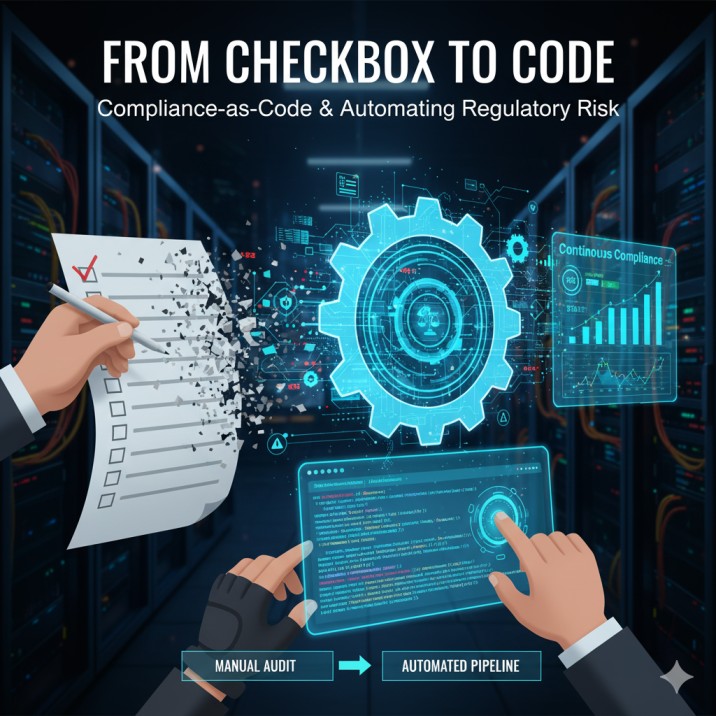
We’ve all been in that meeting. The one where a 200-page audit spreadsheet is projected on the screen, filled with hundreds of line items, manual checks, and columns of “Pass,” “Fail,” or “N/A.” It’s the meeting where the engineering team’s velocity grinds to a halt, replaced by the fear of an upcoming audit. For decades, regulatory compliance—whether for HIPAA, PCI DSS, GDPR, or SOX—has been a manual, reactive, and painful process. It’s been a “checkbox” activity, a bottleneck that everyone dreads.
But what if compliance wasn’t a bottleneck? What if it was just… code?
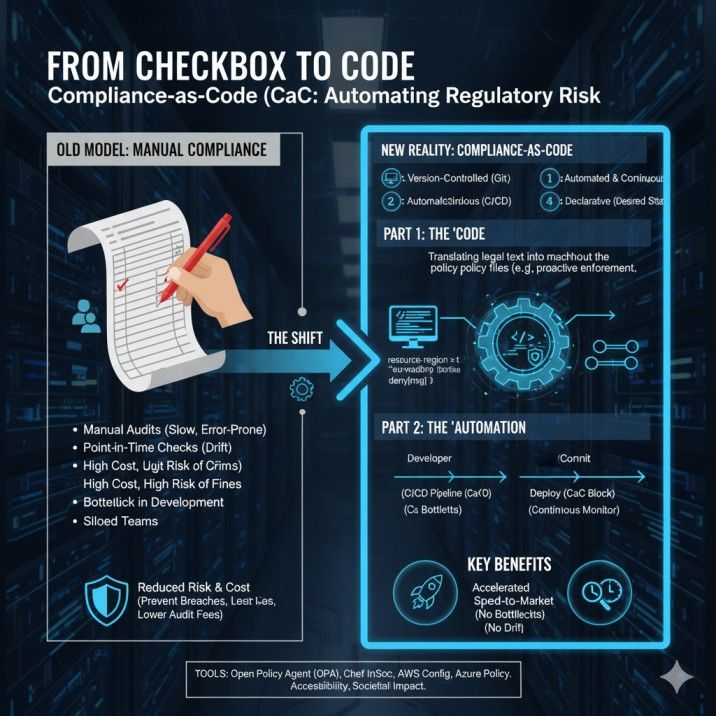
This is the central promise of Compliance-as-Code (CaC), one of the most significant and rapidly emerging trends in regulatory technology (RegTech). Instead of relying on manual audits and human interpretation, Compliance-as-Code is the practice of automating regulatory compliance by writing policy and control requirements directly into software.
It’s a fundamental shift in thinking. It moves compliance from a reactive, end-of-stage gate to a proactive, automated, and continuous part of the entire software development lifecycle (SDLC). This isn’t just a minor improvement; it’s a complete transformation that allows fast-moving companies to innovate and stay safe.
This comprehensive guide will explore what Compliance-as-Code is, the business-critical benefits it delivers, a practical strategy for how to implement it, and the best Compliance-as-Code tools organizations are using to turn legal text into automated, auditable software.
What is Compliance-as-Code (CaC) Explained in Simple Terms?
At its core, Compliance-as-Code is the practice of treating your compliance requirements the same way you treat your application code.
You don’t manually deploy your applications; you automate them with a CI/CD pipeline. You don’t guess what your code does; you write unit tests. You don’t keep code on one person’s laptop; you store it in a version-controlled repository like Git.
Compliance-as-Code applies these exact same DevOps principles to your regulatory rules.
Instead of a rule existing in a PDF document like “All S3 buckets containing financial data must be encrypted,” that rule is translated into a piece of code. This code can then be automatically executed to check your systems.
A Simple Example:
- The Manual Rule (in a document): “All new servers must be deployed in the approved EU-West-1 region to comply with GDPR data residency.”
- The Compliance-as-Code Rule (using a policy engine):
deny[msg] { input.resource.type == "server" input.resource.region != "eu-west-1" msg = "Server deployment blocked: Must be in eu-west-1 for GDPR." }
Now, this code isn’t just a document. It’s an active policy. It can be integrated directly into your deployment pipeline. When a developer tries to deploy a server to the wrong region, the pipeline automatically fails and provides immediate feedback. The compliance violation is prevented before it ever happens.
That is the power of CaC.
The Core Principles of Compliance-as-Code
To truly be “Compliance-as-Code,” a system should follow a few core principles that mirror modern software development.
- Declarative, Not Imperative: Good CaC defines the desired state (e.g., “all buckets ARE encrypted”), not the step-by-step process of how to get there (e.g., “log in, go to this menu, click this box…”). This makes policies simpler to read and maintain.
- Version-Controlled: All compliance rules are stored in a Git repository. This means you have a version control for compliance policies. You can see who changed a rule, why they changed it, and when. This creates a perfect, immutable audit trail.
- Testable: Just like software, compliance rules should have tests. How do you know your “block unencrypted databases” rule actually works? You write a test that tries to create an unencrypted database and confirms that the policy blocks it.
- Automated and Continuous: This is the most important part. Compliance-as-Code is not something you run once a quarter. It is integrated directly into the CI/CD pipeline. It runs on every code commit, every deployment, and continuously monitors your live environment. This is the difference between a point-in-time snapshot and continuous compliance monitoring.
- Collaborative: CaC breaks down the silos between developers, security, and compliance teams. They no longer “throw work over the wall.” Instead, they collaborate in the same repository, using the same tools. A compliance officer might write the intent of a policy in a human-readable file, and a developer implements it as code.
How Compliance-as-Code Differs From Policy-as-Code (PaC)
You will often hear the term Policy-as-Code (PaC) used alongside CaC. The two are closely related but have a key difference:
- Policy-as-Code (PaC) is the technology and the practice of writing any kind of policy (security, operational, or compliance) as code. It’s the “how.” For example, a PaC rule might be, “All services must have a ‘cost-center’ tag.”
- Compliance-as-Code (CaC) is the specific application of PaC to solve regulatory and compliance requirements. It’s the “why.” A CaC rule would be, “All services handling patient data must have an ‘ePHI: true’ tag to enforce HIPAA controls.”
In short, Compliance-as-Code is a specific use case of Policy-as-Code. You use PaC tools to achieve your CaC goals.
The Urgent “Why”: The Growing Crisis of Manual Compliance
For years, companies have survived on manual compliance. So why the urgent need to change now? The short answer: The speed of modern software development, especially with the rise of DevOps and the cloud, has made manual auditing mathematically impossible.
The DevOps Speed vs. The Audit Speed
- Then: A single, monolithic application was updated twice a year. A team of auditors could spend a month checking it.
- Now: A microservices-based application is updated 50 times a day. Infrastructure is “ephemeral,” meaning servers are created and destroyed in minutes.
You cannot use a 6-month manual audit cycle to govern a system that changes every 30 minutes. It’s like trying to take a census of a music festival by mailing out forms. By the time you get any answers, the data is completely wrong.
The High Cost and Risk of Non-Compliance
The stakes have never been higher.
- Financial Penalties: GDPR fines can be up to 4% of global annual revenue. A single major HIPAA violation can cost millions.
- Reputational Damage: A compliance failure is often a data breach. The loss of customer trust can be more devastating than any fine.
- “Compliance Drift” Kills Security: This is a key concept. On Day 1, your system is perfectly configured and compliant. By Day 90, a developer, meaning well, has opened a firewall port for a “temporary test” and forgotten to close it. A setting is changed during a late-night fix. This slow, unintentional “drift” from the compliant state is where breaches happen. Manual audits only catch drift months after the fact—Compliance-as-Code catches it in seconds.
The Complexity of Multi-Cloud and Hybrid Environments
No one uses a single, simple system anymore. A typical enterprise runs applications on AWS, uses Microsoft 365 on Azure, and still has critical databases on-premise.
How do you manually audit this? You need an expert in AWS security, another in Azure policy, and a third in VMware. It’s a logistical nightmare.
A Compliance-as-Code automation strategy solves this. You can use tools that provide a single language to write rules that apply across all your environments. The rule “all data must be encrypted” can be written once and enforced on AWS, Azure, Google Cloud, and your local data center. This is the only scalable way to manage compliance in multi-cloud environments.
The Business Case: Top Benefits of Implementing Compliance-as-Code
Adopting CaC is not just an IT upgrade; it’s a strategic business decision that delivers a powerful return on investment (ROI). The business case for automated compliance is built on speed, safety, and savings.
1. Drastically Reduced Compliance Risk and Cost
This is the most obvious benefit. By automating compliance checks, you prevent misconfigurations from ever happening. This proactive stance is infinitely cheaper than the reactive cost of cleaning up a breach or paying a fine. It also leads to dramatically lower audit costs. Instead of paying auditors to manually check 10,00_0 servers, you show them the automated policy that proves all 10,000 servers are compliant.
2. Accelerated Speed-to-Market
Compliance is the number one compliance bottleneck in DevOps. By integrating CaC into the CI/CD pipeline, you remove this bottleneck. Developers don’t wait weeks for a compliance review. They get an instant pass/fail on their code commit. If the code is compliant, it proceeds to production. This is how CaC accelerates time-to-market, allowing you to out-innovate your competition.
3. Achieving True Continuous Compliance Monitoring
Compliance-as-Code is not a “one and done” scan. It is a 24/7, real-time compliance validation system. The same rules that check code before deployment are used to continuously scan the production environment. The moment a compliant S3 bucket is manually changed to be non-compliant, an alert is triggered, and it can even be automatically remediated. This is the only way to prevent compliance drift.
4. Automated Evidence Gathering for Audits
When an auditor asks, “How can you prove you were compliant on March 15th at 2:30 PM?” What’s your answer?
- Manual Way: “Umm… let me find the spreadsheet. I think Bob was on vacation…”
- CaC Way: “Here is the Git history for our compliance-as-code repository. You can see the exact policy that was in force. Here is the pipeline log from our automated compliance reporting dashboard showing that all 1,200 deployments on that day passed that policy check. And here is the continuous monitoring log showing no drift.”
You have just provided an immutable and auditable history. The audit is over in minutes, not months.
5. Enhanced Developer Productivity and Happiness
Nothing makes a developer more frustrated than being told, two weeks before launch, that their work needs to be completely redone because of a compliance rule they never knew existed.
CaC brings compliance “shift-left.” By using a shift-left compliance strategy, developers get feedback while they are coding, not weeks later. This instant feedback loop makes them more productive, more security-aware, and ultimately happier. It makes compliance a partner, not a police officer.
6. Improved Security Posture (The Power of DevSecOps)
DevSecOps and Compliance-as-Code are two sides of the same coin. A compliance rule like “no public S3 buckets” is also a critical security rule. By automating compliance, you are simultaneously automating a huge portion of your cloud security posture. You are preventing the most common misconfigurations that lead to data breaches.
A Practical Guide: How to Implement a Compliance-as-Code Strategy
This all sounds great, but where do you start? Getting started with Compliance-as-Code is a journey. Here is a practical, step-by-step implementation strategy.
Step 1: Start Small and Define Your Policies
Do not try to boil the ocean. Do not start by trying to automate all of GDPR compliance on day one.
Start with one, high-value, easy-to-understand area. A great starting point is “Infrastructure-as-Code” (IaC) configuration.
- Pick a framework: Choose a critical regulation, like PCI DSS.
- Pick a control: Choose a simple, high-impact control, like “Firewalls must block all non-essential ports.”
- Translate “Legalese” to Code: This is the most crucial step: translating regulatory requirements into code. You must get your compliance officers, security team, and developers in a room to agree on what the rule “means” in a technical context.
- Legal Text: “Ensure access is restricted.”
- Technical Policy: “Deny any security group that allows ‘0.0.0.0/0’ on any port other than 80 and 443.”
Step 2: Choose Your Compliance-as-Code Tools
The market for CaC tools is exploding. They generally fall into two categories:
- Open-Source Tools: These are powerful, flexible, and have strong community support.
- Open Policy Agent (OPA): This is the clear leader and a project from the Cloud Native Computing Foundation (CNCF). OPA provides a high-level declarative language (Rego) that lets you write policies for anything—Kubernetes, Terraform, microservices, and more. It is the “engine” for using Open Policy Agent for compliance.
- Chef InSpec: An excellent tool for compliance testing. InSpec lets you write RSpec-style tests to check the actual state of your running servers. For example:
describe port(22) do it { should_not be_listening } end.
- Cloud-Native Tools: These are built directly into your cloud provider and are the easiest way to start.
- AWS Config and AWS Systems Manager: Automatically assess, audit, and evaluate the configurations of your AWS resources. You can use pre-built rules for CIS benchmarks, HIPAA, and PCI.
- Azure Policy: Enforces your policies on all Azure resources. It can block non-compliant resource creation and provides a great automated compliance reporting dashboard.
- Google Cloud Config Controller: A service that lets you manage your Google Cloud resources using declarative configuration.
Step 3: Integrate CaC into Your CI/CD Pipeline (The “Shift-Left” Model)
Your Compliance-as-Code pipeline is where the magic happens. You should add checks at every stage of the development process.
- On the Developer’s Laptop (Pre-commit): A developer can run a simple command (e.g.,
opa test .) to validate their code against the company’s compliance policies before they even commit it. - During the CI Phase (Commit/Build): This is the most common integration. When a developer submits a pull request, the CI pipeline (e.g., Jenkins, GitLab CI) automatically runs a compliance scan on the IaC code (like Terraform or CloudFormation). If the scan fails, the build is blocked, and the pull request cannot be merged.
- During the CD Phase (Deploy): This is a final, critical check. You can configure your pipeline to run a last-second validation right before deployment. For example, OPA can act as an “admission controller” in Kubernetes, blocking any non-compliant workloads from ever starting.
- In Production (Runtime): As mentioned before, use tools like AWS Config or Azure Policy to continuously scan your live environment to catch compliance drift that happens outside the pipeline (e.g., manual “hotfixes”).
Step 4: Iterate, Expand, and Automate Reporting
Once you have successfully automated your first set of controls, you build on that success.
- Expand: Add more rules from your first framework (e.g., PCI DSS).
- Broaden: Start on your next framework (e.g., HIPAA).
- Report: Pipe all the data from your pipeline failures and runtime scans into a central dashboard. This becomes your automated evidence gathering for audits. Your compliance team can now see the company’s compliance posture in real-time, without ever running a spreadsheet.
Real-World Compliance-as-Code Examples and Use Cases
Let’s see what this looks like in practice for different industries.
Use Case 1: Automating PCI DSS Compliance in E-commerce
- Regulation: PCI DSS Requirement 1.2: “Build firewall and router configurations that restrict connections between untrusted networks and any system components in the cardholder data environment (CDE).”
- The Old Way: A human auditor manually reviews screenshots of all firewall rules, once a quarter.
- The CaC Way:
- A Chef InSpec profile is created:
describe aws_security_group('sg-cde-firewall') do it { should_not allow_in(port: 22, cidr: '0.0.0.0/0') } end. - This test runs continuously against the live environment.
- A Terraform policy check is added to the CI pipeline to prevent such a rule from ever being deployed.
- Result: PCI DSS compliance automation is achieved. The CDE is proactively secured, and audit evidence is generated automatically.
- A Chef InSpec profile is created:
Use Case 2: Enforcing HIPAA Compliance in Healthcare Tech
- Regulation: HIPAA Security Rule § 164.312(a)(2)(iv): “Implement a mechanism to encrypt and decrypt electronic protected health information (ePHI).”
- The Old Way: Relying on developers to “remember” to click the “encrypt” checkbox when creating a database.
- The CaC Way:
- An Azure Policy is written and assigned to the entire subscription:
if: { field: 'Microsoft.Storage/storageAccounts/enableHttpsTrafficOnly', equals: 'false' }, then: { effect: 'deny' }. - This policy also applies to all databases, requiring TDE (Transparent Data Encryption).
- Result: It is now impossible for a developer to accidentally create an unencrypted storage account or database. Automating HIPAA compliance with code has prevented a potential multi-million dollar violation.
- An Azure Policy is written and assigned to the entire subscription:
Use Case 3: Managing GDPR Compliance for User Data
- Regulation: GDPR Article 30: “Data processing activities must be stored in specific geographic regions (data residency).”
- The Old Way: Manually reviewing all new applications and services to see where they are storing data.
- The CaC Way:
- An Open Policy Agent (OPA) policy is written and applied to the company’s Kubernetes cluster.
- The policy denies any deployment that doesn’t have a “region: eu” label and ensures it is only scheduled on nodes physically located in the EU.
- Result: Automating GDPR compliance with code ensures data residency rules are enforced at the infrastructure level, without any developer having to think about it.
What Are the Common Challenges of Implementing Compliance-as-Code?
While the benefits are clear, the journey to CaC is not without its hurdles. Being aware of these cultural and technical challenges of CaC adoption can help you plan for them.
- The Cultural Shift (The Biggest Hurdle): The hardest part is not the technology; it’s the people. You must bridge the gap between compliance teams (who speak “legalese”), security (who speak “risk”), and developers (who speak “code”). This requires a “translator” role and a commitment from leadership to break down silos.
- The Initial Translation Effort: Translating regulatory requirements into code is a difficult, front-loaded task. Your first few policies will be slow and hard to write. This gets much faster over time.
- The Technical Skill Gap: Your compliance and audit teams don’t need to become senior developers, but they do need to learn the basics of Git, CI/CD, and how to read the declarative policies. This requires investment in training.
- Fear of “Automating Away” Jobs: Auditors and compliance officers may fear CaC will make their jobs obsolete. The reality is the opposite. It automates the boring work (checking checkboxes) and frees them up to focus on high-value work, like interpreting new regulations, assessing complex risks, and improving the policies themselves.
The Future of Compliance: CaC, AI, and Continuous Assurance
Compliance-as-Code is the foundation for the future of RegTech. The next evolution is already here:
- AI-Driven Compliance: Imagine an AI that reads a new 500-page regulation (like a new data privacy law) and suggests the new Compliance-as-Code policies needed to comply with it.
- AI-Powered Auditing: An AI that can not only run the tests but also analyze the results and write the first draft of the audit report, highlighting key areas of risk in plain English.
- Continuous Assurance: The ultimate goal is to move from “continuous compliance” (Are we following the rules?) to “continuous assurance” (Are the rules we are following actually effective at reducing risk?).
The future of regulatory compliance is one where the audit is no longer a feared event but a continuous, boring, automated background process.
Compliance-as-Code is the first and most important step on that journey. It is the only proven, scalable, and reliable way for modern organizations to stay compliant, secure, and competitive in a high-speed, cloud-native world. The question is no longer if you should adopt Compliance-as-Code, but how fast you can get started.
Frequently Asked Questions (FAQ) About Compliance-as-Code
1. What is Compliance-as-Code (CaC)?
Compliance-as-Code is the practice of automating regulatory compliance (like HIPAA, PCI DSS, GDPR) by defining, testing, and enforcing compliance rules as code. These code-based policies are then integrated into the CI/CD pipeline and used for continuous monitoring, replacing manual audits.
2. What is the difference between Compliance-as-Code and Policy-as-Code?
Policy-as-Code (PaC) is the general method of managing any policy (security, operational) as code. Compliance-as-Code (CaC) is the specific use case of PaC to enforce regulatory and compliance requirements. You use PaC tools to achieve CaC.
3. What are the main benefits of Compliance-as-Code?
The main benefits are reduced compliance risk by preventing violations, faster speed-to-market by removing audit bottlenecks, lower audit costs through automated evidence gathering, and improved security by integrating compliance into the DevSecOps workflow.
4. How does Compliance-as-Code work in a CI/CD pipeline?
CaC is integrated at multiple stages. It can scan Infrastructure-as-Code (IaC) files (like Terraform) during the build (CI) phase and block non-compliant changes. It can also act as an “admission controller” to block non-compliant deployments (CD) and continuously scan the production environment for drift.
5. What are the best Compliance-as-Code tools?
Popular open-source Compliance-as-Code tools include Open Policy Agent (OPA) for general policy enforcement and Chef InSpec for testing the state of live systems. Cloud-native tools like AWS Config, Azure Policy, and Google Cloud Config Controller are also excellent starting points.
6. How does Compliance-as-Code help with audits?
It provides automated evidence gathering. Instead of spreadsheets, you provide auditors with a time-stamped, immutable Git history of all compliance rules, plus logs from your CI/CD pipeline and monitoring dashboards that prove these rules were enforced.
7. What is a “shift-left” compliance strategy?
“Shift-left” means moving a process earlier in the development lifecycle (to the “left” on a timeline). A shift-left compliance strategy gives developers instant compliance feedback while they are coding, rather than making them wait for a manual audit after the work is done.
8. Is Compliance-as-Code only for cloud environments?
No. While it is extremely popular for managing cloud complexity (e.g., managing compliance in multi-cloud), tools like Chef InSpec and OPA can be used to write and enforce policies on on-premise servers, virtual machines, and databases.
9. What is “compliance drift” and how does CaC prevent it?
Compliance drift is the natural process where a system “drifts” from its original, compliant configuration due to manual changes, hotfixes, and misconfigurations. CaC prevents this by continuously scanning the live environment against the “golden” policy, instantly detecting and alerting on any unauthorized changes.
10. What is an example of automating HIPAA compliance with code?
A common example of automating HIPAA compliance is writing a policy that automatically denies the creation of any new database or storage bucket unless it has “encryption-at-rest” enabled. This makes it impossible to store unencrypted ePHI.
11. How can I get started with Compliance-as-Code?
Start small. Pick one regulation (like PCI) and one simple control (like “no public SSH access”). Work with your compliance and dev teams to translate that one rule into code using a tool like OPA or your cloud provider’s policy service. Then, integrate that check into your CI/CD pipeline and build from that first success.
12. What is the role of developers in Compliance-as-Code?
Developers are key stakeholders. In a CaC model, they are empowered to see and run compliance checks themselves. This makes them more security-aware and more productive, as they get instant feedback instead of waiting for a manual review.
13. What is the business case for Compliance-as-Code?
The ROI of Compliance-as-Code comes from three areas:
- Cost Savings: Drastically reduced audit costs and fines.
- Risk Reduction: Proactively preventing breaches and non-compliance.
- Speed: Accelerating time-to-market by removing the compliance bottleneck.
14. What are the biggest challenges in adopting CaC?
The biggest challenge is cultural, not technical. It requires breaking down silos and getting compliance, security, and developer teams to collaborate and speak the same language. There is also a learning curve in translating legal requirements into code.
15. How does CaC relate to DevSecOps?
DevSecOps and Compliance-as-Code are fundamentally linked. DevSecOps is the culture of building security into the DevOps lifecycle. CaC is the technical implementation of the “compliance” part of DevSecOps, automating the rules and controls directly within the pipeline.